The Collection is an in-run reference that opens with C, the View button or the right-side tab. It records the units, enemies, Cores and items you have encountered, and four official achievements track completion: Every Soldier, Know Your Enemy, Core Collector and Item Collector. It is the cheapest way to learn from a bad wave before the run ends.
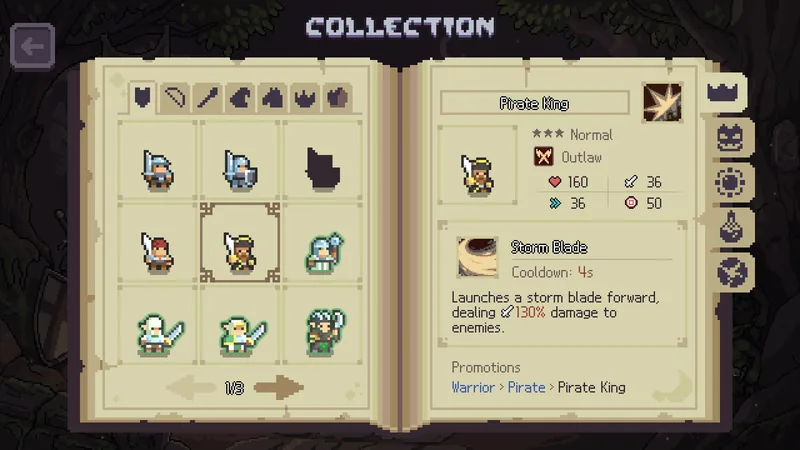
Most players find the Collection by accident, usually while looking for a pause button. It is not a pause button. It is the game’s own record of what you have met, and one of the few places where a bad wave turns into information you can use in the next one.
Opening it
The Collection opens during a run with C, the View button on a controller, or the right-side tab in the interface. That is official: the patch that added the current layout lists all three. It is available mid-run, which is the point — the enemy that just broke your line is still on screen, and its entry is one keypress away.
Four ledgers
| Tab | What it records | Open it when |
|---|---|---|
| Units | Units you have met | Before absorbing a unit you have not promoted |
| Enemies | Enemies you have fought | Immediately after a wave that cost you lives |
| Cores | Cores you have seen | Before choosing a Core reward |
| Items | Items you have seen or bought | Before a shop refresh, not after |
The four collection achievements
The four completion achievements line up with the four ledgers by name: Every Soldier for units, Know Your Enemy for enemies, Core Collector for Cores, Item Collector for items. All four are official. We do not have official completion thresholds for any of them, so treat any “you need X entries” figure as community-reported.
Read the thing that killed you
The useful habit is narrow: when a wave ends badly, do not restart immediately. Open the enemy ledger, find the unit that broke your line, and read its name. Names are handles. Once you know the handle, you can recognise the enemy on the field next run, in a Steam thread, or in the Collection itself — and recognition is most of the fight.
There is a second use for the unit ledger: it records what you actually fielded, which is not what you remember fielding. Runs blur, especially at speed, and “I have tried the Mage line” often means “I saw a Mage once”. The ledger separates a preference from a sample.
Check the promotion entry before you feed
Absorption is irreversible, and the Collection is one of the few places in a run where a unit’s promotion information sits still long enough to read. Before you feed a unit you have not promoted, open its entry. If the Collection shows a promotion line, that unit is a candidate, not food. That applies most sharply to the three sourced chains: Mage → Cleric → High Priest, Duelist → Veteran → General, and Archer → Crossbowman or Patroller.
What it will not tell you
- Drop rates. The game does not publish them, and the Collection is a record of encounters, not an odds table.
- What to build. It records units; it does not rank them. The tier list is opinion, and labelled as such.
- Official totals. The community counts above are estimates from community data, not figures confirmed by the game.
A three-second habit
Open the Collection at two moments: after a lost wave and before a big absorb. Everything else is browsing. Do that for three runs and you will know the enemy names that end your runs and the units that were worth keeping — which is more than most tier lists will tell you.
The absorb page covers what happens after you decide a unit is a keeper, and the boss guide is where the enemy ledger pays off most. Every panel shortcut is listed in the controls reference.
FAQ
How do I open the Collection in Slotbound?
Press C, use the View button on a controller, or choose the right-side tab. It opens during a run, so you can check an entry without quitting.
What are the four collection achievements?
Every Soldier, Know Your Enemy, Core Collector and Item Collector. All four are official and correspond to the units, enemies, Cores and items ledgers.
Does the Collection show drop rates?
We have not seen them there, and the game does not publish symbol or unit drop rates. Treat any percentage you see in a guide or video as community-reported.
Do I need the Collection for 100% achievements?
The four completion achievements are part of the official 64. Whether other achievements also check collection entries is not something we can confirm, so treat that as unverified.